
A six-pocket organiser with checkable dimensions
Build and check the organiser
This original project uses two sheets: one backing and six cut-out pieces. The PDFs distinguish A4 from Letter; they are not recovered historical files or a tested print run. Use the organiser for light notes. Load strength has not been tested.
- Choose the A4 or Letter PDF in your language. Print its two pages at actual size, without fitting. Measure the 100 mm control line before cutting; if it is not 100 mm, correct the scale and check again.
- Cut out the 170 × 230 mm backing and six 70 × 55 mm pieces. Each piece has a 60 × 45 mm front, 5 mm side tabs and a 10 mm bottom tab. Fold tabs backwards along the dashed lines; do not cut those lines.
- Align fronts with the backing marks: columns 15 and 95 mm from the left, rows 30, 95 and 160 mm from the top. Apply suitable glue only to the rear tabs, attach and allow to dry according to the adhesive. Leave each top edge open.
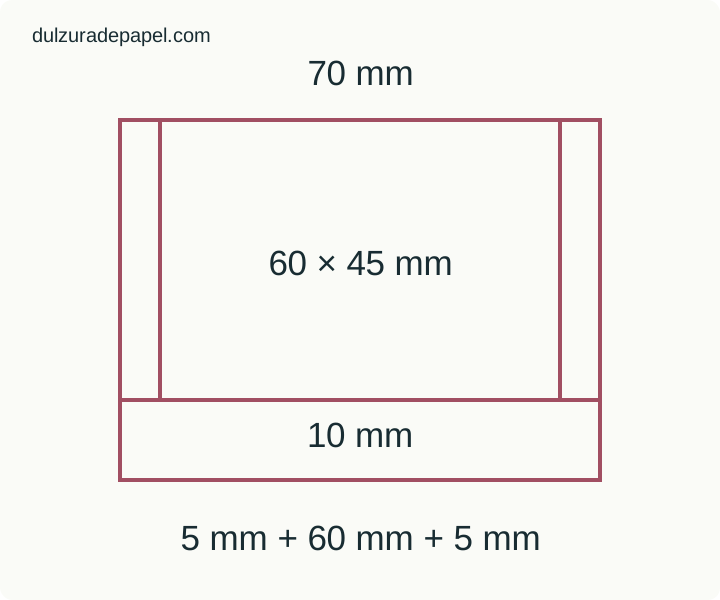
Worked record
| Materials | Two sheets of the same size, ruler, scissors and suitable paper adhesive. Supervise tools where appropriate. |
|---|---|
| Geometry check | Two 60 mm columns with a 20 mm gap; final right edge at 155 mm. Last front ends at 205 mm, inside the 170 × 230 mm backing. |
| Before use | Check that each opening remains free and tabs are attached. Start with a light note; do not describe it as a load-bearing holder. |
| Record | Paper size __; measured control line __; print scaling __; free opening __; drying __; necessary change __. |
Print templates
Attach the tabs to the backing, not to each other, and keep room to insert a note. The digital geometry is specified in millimetres; your physical print and assembly still need checking.
Primary sources: Adobe: page size and actual-size printing